Restrict who can see a sharing link
You're about to share a dashboard via a Sharing Link and you want to be confident that only the right people can open it. This guide helps you pick the right combination of restrictions for your situation.
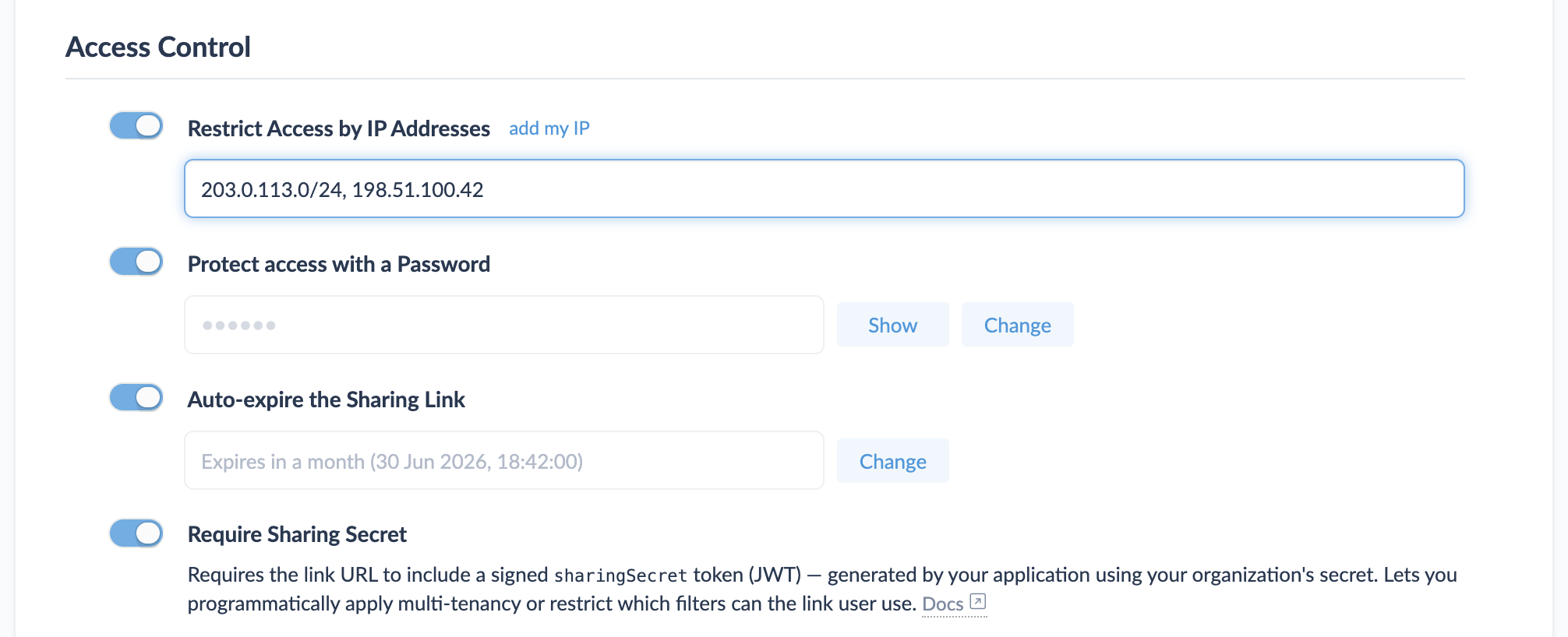
All of these restrictions live in one place — the sharing link's Settings tab → Access Control section:
Pick a starting point
Sharing links have four overlapping restrictions, in roughly increasing strength:
| If you want to … | Use … |
|---|---|
| Limit access to a known set of IPs / networks (e.g. office VPN) | Restrict Access by IP Addresses |
| Require a shared secret known only to recipients | Protect access with a Password |
| Make the link auto-revoke after a date | Auto-expire the Sharing Link |
| Tie access to your application's user identity, programmatically | Require Sharing Secret (JWT, advanced) |
These aren't either/or — you can combine them. Each one closes off a different threat.
Common scenarios
Internal dashboard for the office network
You want teammates to access the link from the office without typing a password every time, but you want to block external access entirely.
- Open the link's Settings tab → Access Control.
- Turn on Restrict Access by IP Addresses.
- Enter the office's public IP, or a CIDR range — for example
203.0.113.0/24. Use the inline add my IP link to grab your current public IP if you're not sure. - (Optional) Set Auto-expire the Sharing Link if the dashboard only needs to be available for a finite window.
Investor / customer share with extra confidentiality
You want to share a sensitive dashboard with a specific group of people, with auto-revocation after a couple of weeks.
- Access Control → Protect access with a Password. Type a strong password (or use a password manager) and save.
- Access Control → Auto-expire the Sharing Link. Choose a preset (1 Week, 1 Month) or Custom… and pick a specific expiration date.
- Distribute the link and the password on different channels — e.g. the link in email, the password in Signal.
- (Optional) Add IP whitelisting if you also know the recipients' network ranges.
Embedded dashboard customised per signed-in user
You're embedding Cluvio inside your product and each viewer should only see their own data.
This is its own dedicated guide:
Embed a dashboard scoped per customer.
The short version: turn on Allow User to Change Filters plus
Require Sharing Secret, then have your backend sign a JWT carrying
a fixed_parameters map that pins the user's identity.
What each restriction actually checks
- Restrict Access by IP Addresses — checked at request time against the viewer's apparent public IP. CIDR ranges are supported. Blocks anyone outside the listed addresses with a 403, even if they have a valid link.
- Protect access with a Password — viewer is prompted for the password before the dashboard loads. The password is not in the URL.
- Auto-expire the Sharing Link — the link returns a 403 with "Sharing link expired" after the configured timestamp. Independent of any password / IP / secret.
- Require Sharing Secret — viewer must arrive at the URL with
a
sharingSecretquery parameter holding a JWT signed by your organization's Embed Secret. The JWT itself carries its own short-lived expiration (exp) and optionally afixed_parametersmap locking specific filter values. This is the foundation for embedded, multi-tenant dashboards.
A note on revocation
If you ever need to immediately revoke access to a link, the most
durable revocation is to delete the link from its Settings tab
(Danger Zone). The sharingToken UUID is invalidated server-side,
so any saved copy of the URL stops working — there's no way for a
stale copy to keep functioning.
If you're using Require Sharing Secret and you need to revoke a class of access (e.g. you suspect your Embed Secret was leaked), use Reset Secret… on the Embed Secret in Admin → API Keys & Secrets. JWTs signed with the old secret keep working for a 24-hour grace window so you can roll your applications without downtime; Expire Now… on the previous secret ends that window at once, which is what you want when the old secret was leaked.
Related
- Reference: Sharing Links → Settings → Access Control — full description of each option.
- Reference: Sharing Link Security — the security model and additional recommendations.
- How-To: Embed a dashboard scoped per customer.